What is a Student ID Card Printer?
A student ID card printer is a practical device used by schools, colleges and universities to produce identification cards for students. These printers produce durable plastic cards containing all the essentials—student names, photos, ID numbers, barcodes, or even RFID chips. With these cards, schools can easily identify and manage students on campus with minimal fuss.
Why Schools Need a Student ID Card Printer
Student ID cards aren’t just for showing who belongs on campus—they’re a vital part of running a safe and organised school. Having a student ID card printer on-site allows schools to print professional ID cards on demand while maintaining full control over their student ID system.
These cards are used for a wide range of purposes, including:
- Campus access
- Library systems
- Attendance tracking
- Cashless payments
- Transportation passes
- Event participation
In short, a student ID card is more than just a card—it’s a tool for security, access control, and smooth campus operations. Staff and security personnel can quickly verify a student’s identity, keeping unauthorised visitors out. Many student ID cards are even equipped with RFID or magnetic stripes, allowing easy control over entry to buildings, dormitories, libraries and labs, while connecting to databases for attendance, class registration and events.
Types of ID Card Printers for Students
Choosing the right printer depends on your school’s size, budget, and security requirements. Here’s a brief guide:
1. Direct-to-Card (DTC) Printers
- These printers apply ink (dye-sublimation or thermal transfer) directly onto PVC cards. They are ideal for producing standard student ID cards with photos and basic details.
- Best for: Small to medium schools
- Why: Reliable, affordable, fast, and perfect for basic ID cards, membership cards and access badges
2. Retransfer (Reverse Transfer) Printers
- Rather than printing directly onto the card, these printers first print onto a transparent film before transferring it to the card. The result is high-quality, secure student ID cards.
- Best for: Universities or large campuses requiring high-resolution graphics or extra security
3. Single-Sided vs. Dual-Sided Printers
- Single-sided: Prints on one side—suitable for basic cards.
- Dual-sided: Prints on both sides, allowing you to add emergency contacts, school rules, or barcode information on the back.
4. Magnetic Stripe & Smart Card Encoding Printers
If student cards are used for payments or library access, you’ll need printers capable of handling:
- Magnetic stripes
- Contact smart chips
- Contactless chips / RFID / NFC
These make life simpler for students and help schools manage student data efficiently.
5. High-Volume Printers
If your university issues thousands of student ID cards each term, a high-volume printer with automatic feeders and large ribbons can save a significant amount of time.
Where to Buy Student ID Card Printers Online
Search terms such as “student ID card printer near me” on Google to find suppliers. If you cannot locate one locally, try including a country or platform in your search:
“Student ID card printer manufacturer in China.”
“Student ID card printer on Amazon”
“Student ID card printer supplier”
While physical stores are an option, online purchases are typically more convenient and cost-effective.
Card Design and Software Compatibility
A printer alone isn’t enough—you’ll also need compatible software to design professional student ID cards. The right software ensures that photos, names, barcodes, and security features print accurately every time.
Key features to look for:
- High customisation for student ID cards: photos, names, IDs, school logos, barcodes, QR codes, expiration dates
- Integration with school databases to import student information automatically, reducing manual entry
- Bulk printing capabilities for efficient card production
- Security Features for School ID Cards
- Student ID cards often act as security tools. Advanced software can support:
- Barcodes and QR codes
- Magnetic stripes
- Smart chip encoding
These features help keep campuses safe and make it easier for students to access libraries, cafeterias, and other facilities.
Cost Considerations
Purchasing a student ID card printer is just part of the overall cost. You’ll also need:
- Ribbons
- Blank PVC cards
- Other accessories
If your school prints only a small number of cards occasionally, it may be more practical to use student ID card printing services instead. For small schools or nurseries, outsourcing is often the smarter option.
Recommended Student ID Card Printer Setup
For a smooth start each term, you’ll need:
- PVC cards: Ensure you have enough blank cards for new students.
- Ribbons: Keep a good supply—these run out quickly.
- ID card camera/webcam: Capture high-quality student photos. Smartphones can work, but dedicated cameras often provide better results.
- Signature pad: Collect digital signatures to verify students and grant access to resources.
- Card laminator: Some printers do not laminate, so check whether you need one.
- Card punching tools: Optional, depending on whether lanyards or badge holders are used.
Conclusion
The right student ID card printer enables schools to produce secure, professional, and durable ID cards while maintaining full control over campus identification. When selecting a printer, consider:
- Printing technology
- Print quality
- Security features
- Software compatibility
- Budget and printing volume
Recommended Masung Student ID Card Printers
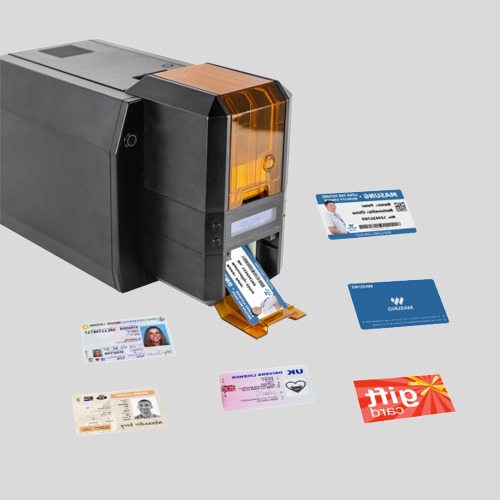
Masung MS-CH22 – Single-Sided ID Card Printer for students
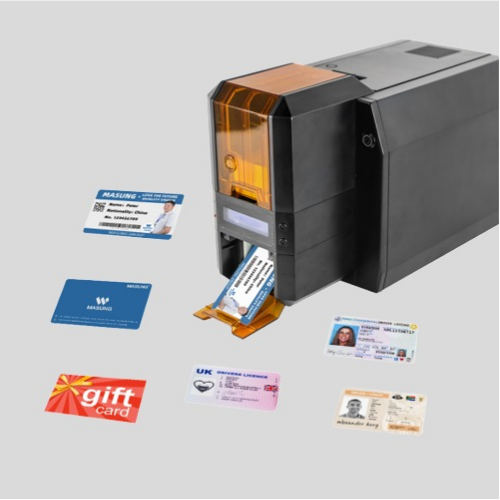
Masung MS-CH22K – Double-Sided ID Card Printer for Students
Features:
High-resolution thermal transfer printing
Optional RFID, contact IC, and magnetic stripe encoding
Personalisable software for flexible design editing
Fast card issuance: ~12 seconds for double-sided monochrome, ~42 seconds for full-colour cards