Why Family-Run Coffee Shops Need Flexible Coffee Packaging Solutions
For family-run coffee shops, packaging needs often depend on the size of each batch, the variety of coffee offered, and how frequently products change. Unlike larger brands with established product lines, small businesses may work with seasonal blends, limited releases, or small-batch roasting. Choosing a coffee bag printer for family-run coffee shops starts with understanding these everyday requirements.
These changing needs can make packaging decisions less straightforward. Pre-printed bags provide a consistent appearance, but different designs or product details may require separate orders. Labels offer another way to update information, although they also involve additional materials and handling.
Some coffee businesses look beyond pre-printed packaging and consider printing product information and branding in smaller quantities. A coffee bag printer for small business use may offer another approach, depending on the materials, printing requirements, and production scale.
Coffee Bag Printers: Printing Technologies, Types, and Applications
A coffee bag printer is a machine used to add branding, product details, dates, or codes to coffee packaging. Depending on the technology, it may print directly onto compatible bag materials or use a specific printing process to produce the required text and graphics.
For family-run coffee shops and small roasters, two printing approaches worth understanding are digital printing, particularly digital inkjet printing, and thermal transfer printing. They serve different needs in terms of design flexibility, print content, and production requirements.
- Digital Printing: Digital printing reproduces digital artwork on a compatible printing surface and can accommodate multiple colors, detailed graphics, and frequent design changes, depending on the printing system. It can be useful for customized packaging and short production runs, although equipment costs, material compatibility, and per-unit costs vary by system. Businesses seeking a custom coffee bag printer should check whether the selected system supports their desired artwork and bag materials.
- Thermal Transfer Printing: Thermal transfer printing uses heat to transfer ink from a ribbon onto a compatible surface. A thermal transfer printer for coffee bags may be suitable for text, dates, batch numbers, barcodes, and simple logos where clear, consistent output is more important than full-color graphics. It may suit businesses that need to update product information frequently, provided the printer, ribbon, and packaging material are compatible.
The choice depends on the type of content to be printed, the packaging material, and the expected production volume. Before purchasing, confirm whether the selected machine supports direct printing on the intended coffee bags and test samples using the actual packaging material. This is particularly important when comparing printers for coffee bags with equipment designed for labels or other packaging formats.
Key Factors to Consider When Choosing a Coffee Bag Printer
Choosing the right machine involves more than comparing prices or print resolution. Family-run coffee shops should evaluate both immediate needs and long-term operating requirements before investing. When comparing options for a printer for small bag packaging, focus on the following factors.
1. Print Quality and Design Requirements
Start by identifying what you need to print. Simple text, roast dates, and batch codes require different capabilities from colorful logos or detailed graphics. Check resolution, printable width, and actual sample results to ensure the machine meets your branding requirements. Confirm how easily you can create, save, and update designs and product details if you need a highly customizable printer for coffee bags.
2. Purchase Price and Running Costs
A lower purchase price does not always mean better value. Consider ongoing expenses such as ribbons, ink, labels, replacement parts, and maintenance. For small businesses, the total cost per bag can be more useful than the initial equipment price alone.
3. Packaging Material Compatibility
This is an easy factor to overlook. Coffee bags may use kraft paper, coated surfaces, or multilayer laminated films. Not every printer can produce clear, durable marks on every material. Test your actual bags before purchasing, especially if they have glossy, textured, or uneven surfaces.
4. Printing Speed and Ease of Operation
Consider how many bags you need to print during a typical day and whether the machine fits your available workspace. Simple controls, convenient feeding, and straightforward design updates can reduce staff training and interruptions during busy periods.
5. Food Packaging Safety and Seal Integrity
Check whether the printing materials and process are suitable for the intended packaging application. Consider potential ink or ribbon migration where relevant, and follow applicable food-packaging requirements. Keep printed areas clear of sealing zones where necessary, and verify that printing does not affect the bag’s barrier properties or seal integrity.
6. Flexibility for Future Growth
Your needs may change as you introduce new blends, seasonal products, gift sets, or wholesale orders. Consider whether the printer can accommodate different bag sizes, changing content, and your expected production volume. Also check software compatibility, technical support, and the availability of consumables before committing.
Ultimately, the best coffee bag printer is not necessarily the fastest or most expensive. It is the one that produces the required results on your actual packaging, fits your budget, and remains practical as your coffee business evolves.
A Practical Coffee Bag Printing Solution for Family-Run Coffee Shops: Masung CH572
For family-run coffee shops, packaging needs can change with different blends, seasonal roasts, and small-batch orders. Ordering pre-printed bags for every product variation may not always be practical. If you need to update product details or branding more flexibly, the Masung CH572 is one option to consider as a coffee bag printer for compatible packaging materials.
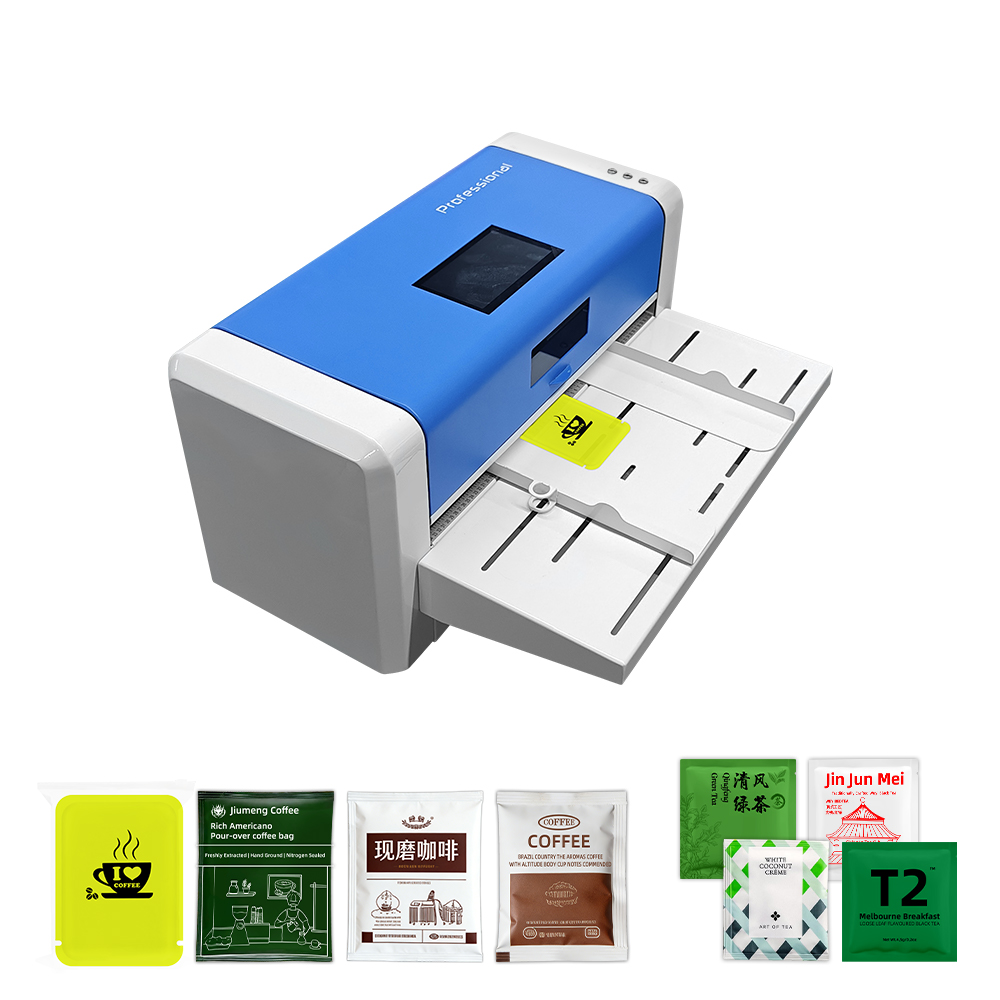
Masung CH572
Type: Thermal transfer printer
Key Features:
- 300 DPI resolution for printing text, product details, and simple logos
- Touchscreen operation for everyday printing tasks
- Automatic inductive feeding to support the printing process
- Maximum print width: 252 mm
How It May Help
The CH572 may suit coffee businesses that need to print changing product information, such as blend names, roast details, or batch codes, without relying entirely on pre-printed packaging. Its 300 DPI resolution is suitable for text and simple graphic elements, while the integrated touchscreen provides a convenient way to operate the printer.
For businesses considering a custom coffee bag printer, it is important to check how printing content is created and updated before making a decision. Confirm whether the printer can accommodate your bag dimensions and material. Ask for a sample printed on your actual coffee bags to assess clarity and layout, and check ribbon costs and routine maintenance to understand the ongoing requirements.
Conclusion: Making Coffee Bag Printing Work for Your Coffee Business
Choosing the right coffee bag printing method starts with three questions: What do you need to print? How often does your packaging information change? How many bags do you typically produce per batch? Digital printing may suit colorful, customized designs, while thermal transfer printing can be appropriate for text and codes on compatible materials.
Before investing in equipment, compare the total operating costs of suitable options and test samples using your actual coffee bags. Evaluate print quality, material compatibility, and workflow requirements. If direct printing is not practical, printed labels may be worth considering as an alternative.
By defining your requirements and testing options before making a purchase, you can choose a printing approach that fits your current operations while leaving room for future growth.